how to leave a post or how to leave a thread
How to Make a new Thread ..
Silkysteps has lots of forums - please take your time to wander through .. gradually you'll see a pattern appear as to how things work.
The 'Top level forums look like this:
If you have a question you'd like to post (make a new thread/topic).. click on to the forum link that best suits what your question is about ..
Then look out for this button:
(the button featured here won't work)

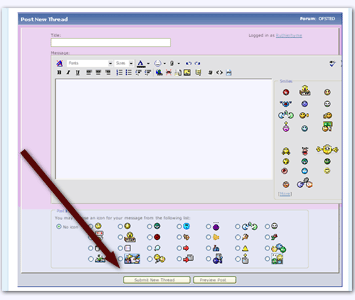
Click it and a page will open with an 'Editor attached - type in your question, activity idea or article or news and click submit

You can check if you have the right forum at any time by reading the description box: for example this image shows it is in the Policy and Planning forum ..

Please don't ever worry about posting in the wrong place.
Part of my job is to keep everything in places that are easy for other readers to find - If your post/thread is moved I'll usually drop a reply in and check it was ok to do so

Looking for answers already on the site:
advanced search page
Quick search is located next to the bear & postbox .. above and to the right - it's a dropdown box when you 'mouse over it and can enter search keywords, reference numbers, assessment criteria, activity themes. Click search now and existing threads will be returned for you.
To keep up with replies to your questions
1.
Manually, by clicking your username. Once clicked you will be taken to a profile page that has a link to 'find all threads, or find all posts' from there you can see which questions have had new entries or replies made.
2.
Automatically. The forum can send email alerts to you when someone makes a reply to a thread but this requires a member to click a 'thread subscription icon'.To find this icon you must be 'in the thread you want to subscribe to.
On the tool bar click the link that says 'Thread Tools' then click 'subscribe to the thread' from there you can set notification preferences.
To manage all your thread subscriptions
go to you private UserCP and click subscriptions.
__________________________________________________ _______
POST ID url:
http://www.silkysteps.com/forum/showthread.php?p=11183#post11183










 &
& 


 Threaded Mode